

Conversation logs
Review Cintesa visitor chat transcripts — separate from the contact list and from usage logs.
Last updated on
Open Contacts → Conversation logs. This is the transcript of a visitor session on this project. It is not the same list as All contacts, and it is not the Activity or Usage log.
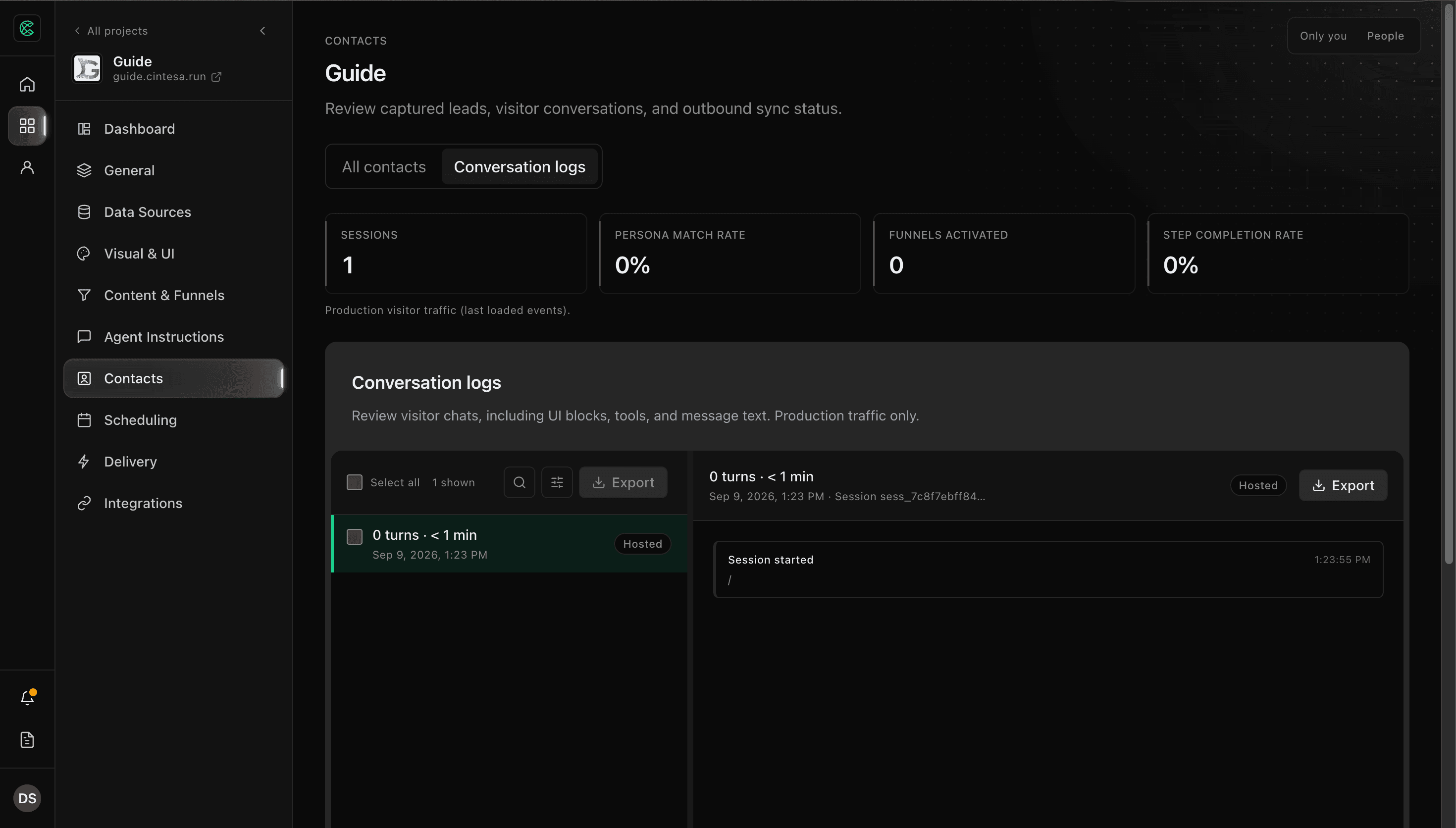
Contacts and Conversation logs unlock after the five-step workflow is complete.
What you see
- Open Contacts, then Conversation logs. Conversation logs in the project menu opens this same list on that visit. Reloading the page loads it as well.
- Use the session list. Sessions with no visitor turns stay hidden until you choose All sessions under Turns. Filter by how many turns the visitor took, when the session was last active, Funnel, and whether it has a contact. Search by session id, visitor id, or transcript text. Source (hosted site or embed) appears only when this project has embed origins configured.
- Open a session to read the transcript in the split view. Each typed request appears before the reply it produced. The transcript is what the visitor saw. A curated section is shown as the copy on that section. The section name and its agent instructions stay in the editor. Tool names and how the reply was built sit under Response diagnostics, closed until you open them. When a reply recorded both clocks, diagnostics also show Server completion (when the agent finished) and First visible render (when that reply first appeared). A reply can finish before it is visible. When a reply leaves out a block it could not show, diagnostics name that block type and the reason. The block text stays in the transcript, not in the diagnostic. Follow-up turns remember the sections and actions already shown in that conversation. The length next to the turn count is the time the visitor and agent were actually exchanging. A quiet gap does not add to it. A new message after more than 30 minutes of quiet starts a new session. On a project with more than one language, a conversation stays in the language of the page where it started. Choosing another language starts a separate session. The earlier session stays in this list in its own language. The session header shows that language when it was recorded.
- Export selected sessions to CSV from the toolbar when you need a file. The content column is the visitor transcript. Diagnostic details stay in metadata. Older sessions still open.
If the session includes a lead submission, jump to the linked contact. From a contact profile, View conversation opens the matching session.
If the list cannot load, the tab says so and the count reads 0 shown. That is a failed load, not an empty project. Opening All contacts no longer waits on this list.
What is stored here
Message text, CTA clicks, and session / visitor ids. Emails and phone numbers in the transcript are redacted in stored content. Lead payload keys are stripped.
How the agent answered still comes from published Agent Instructions plus Sources — the log is a record, not a second brain.
When a reply fails
The transcript is the reply the visitor saw. When a reply cannot finish, that line is the project's fallback message on its own. The failure code stays under Response diagnostics.
If looking up Sources is slow, the reply still continues from the published Agent Instructions. The visitor's message stays in the thread.
A stop for the included message limit still shows Conversation error in the conversation. Those notices are listed on Reply expectations.
Contacts vs conversation logs vs usage
| Surface | What it is | Cleanup |
|---|---|---|
| All contacts | Leads from forms, chat capture, bookings | Kept until you archive or delete the contact |
| Conversation logs | Chat session history | Grows until log retention ships (see below) |
| Usage log | Production events (sessions, clicks, Funnel steps) | Same planned window as conversation logs — not a transcript |
Retention
Today, conversation events are kept until you export or the platform later applies a plan window. Contacts and form submissions are not removed when conversation logs are cleaned up.
Plan windows for logs (7 / 30 / 90 / 365 days) are listed on billing catalogs but not enforced yet. When that ships, Limits and Visitor data & privacy will say so. Do not assume old transcripts disappear today.
© 2026 Cintesa. Guide text and screenshots are Cintesa product materials for personal and operator use. Do not scrape or republish them commercially without permission. Terms of Service · Privacy Policy.