

Languages & SEO
Set Cintesa locales, per-locale SEO, social profile URLs, and locale path-prefix traffic rules.
Last updated on
Languages and SEO live under General. They are not separate workflow steps.
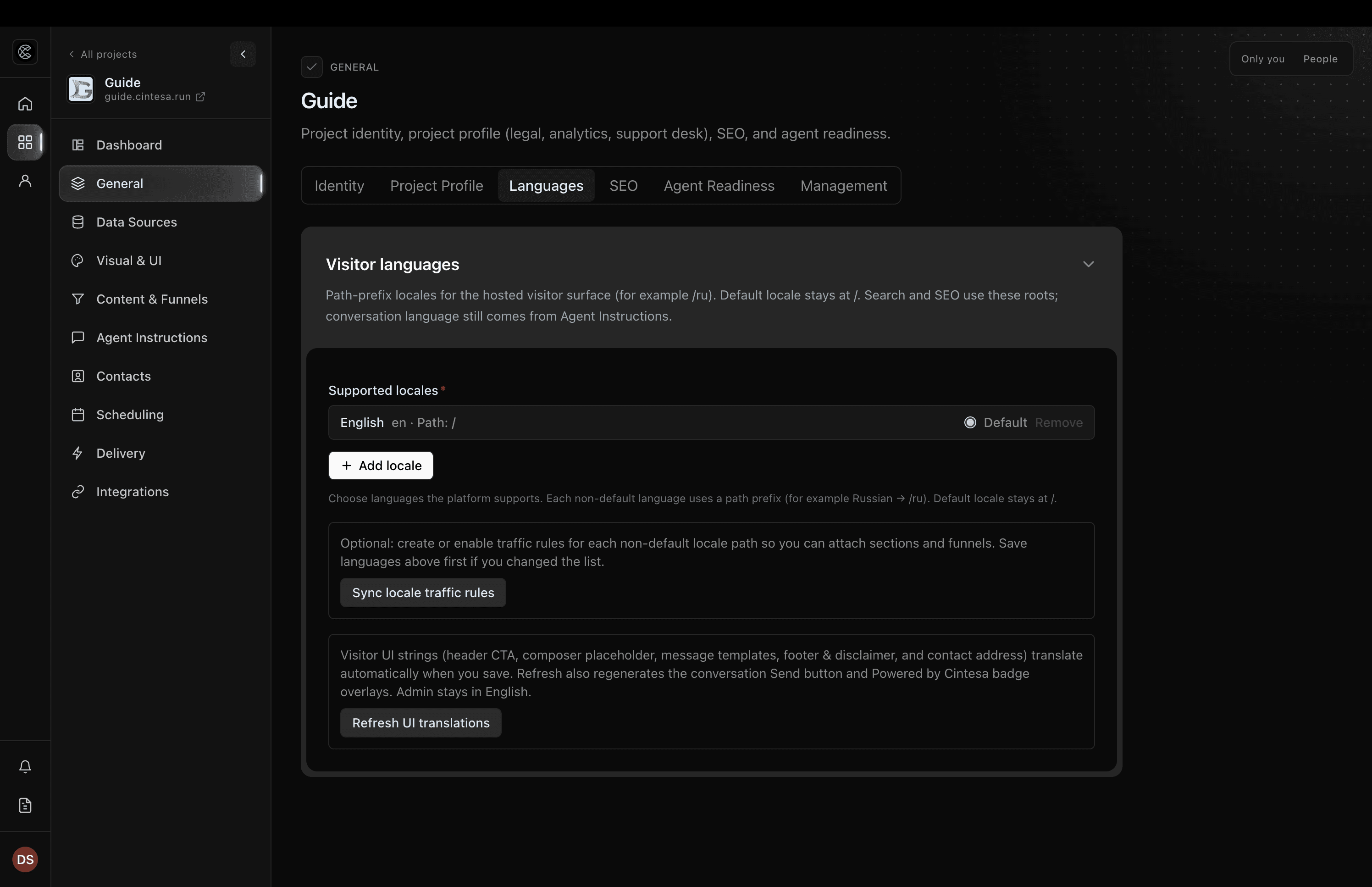
Languages
- Open General → Languages.
- Set the default language and any extra locales (path prefixes such as
/ru). - Assign each Content section to a language (or all languages). Default-language packages stay on the default URL; they do not fill
/ru.
The language switcher is configured under Visual & UI → Page layout. A one-language campaign can override that visibility on its traffic rule without changing locale URLs, hreflang, or RTL layout. Each language in the switcher is labeled in that language, on every page. English stays English. Russian is written in Russian, and Hebrew is written in Hebrew.
Visitor chrome (composer Send, footer headings, default badge, empty form labels, and the appointment scheduler, including weekday names) follows the URL locale. Plan names, custom CTA labels, and agent headlines stay operator- or instruction-authored. A scheduling service name, description, and price label use the translation you publish for that language, or the default-language text when you have not published one. Edit those on Scheduling → Services.
A Funnel with no language is the default language. It does not appear on the other language pages. Duplicate the Funnel to offer another language.
The conversation stays in the language of the page. Choosing another language ends that conversation and starts a new one in the language you chose. The earlier conversation stays in Conversation logs in its own language. Choosing the language that is already open keeps the conversation. Choosing a suggested button does not change that language or the text direction. Russian stays left to right. Hebrew and Arabic stay right to left. On a Hebrew or Arabic page, the visitor’s request and the person icon stay on the right side of the conversation, in the same place as on a left-to-right page. Replies stay right-aligned, and the blocks in a reply keep their right-to-left layout.
Choosing a card or other control inside a block asks in the page language. Later choices from those controls stay in that language. The project default language is used for that request only when the page itself is in the default language. A request you wrote stays as you wrote it.
Built-in labels, such as Send, use the page language, or English when that language has no built-in label. Text you wrote uses the translation for that page, or the default-language text when a translation is missing. It does not switch to a different extra language. Cards, replies, suggested questions, and reused funnel replies on a page stay in that page’s language. A sentence or card written in another language is left off the page. A product name inside a sentence can stay. If that page has no matching website text, the default language can still inform the reply, and the visitor still does not see sentences written in another language. The contact form and the booking widget stay on the page.
Admin stays English.
After you add extra locales, Sync locale traffic rules on this tab creates path-prefix traffic rules for non-default languages and sets each rule’s Language to that locale. Campaign rules can also pick Language themselves (all languages, or one language). It does not replace campaign or returning-visitor rules. Those path-prefix rules are language URL compositions — Live surface previews them as a Language, not as a traffic-rule composition.
Plan-related feature. Creating those traffic rules is available on Starter or higher (Funnels & traffic rules). See Plans.
SEO
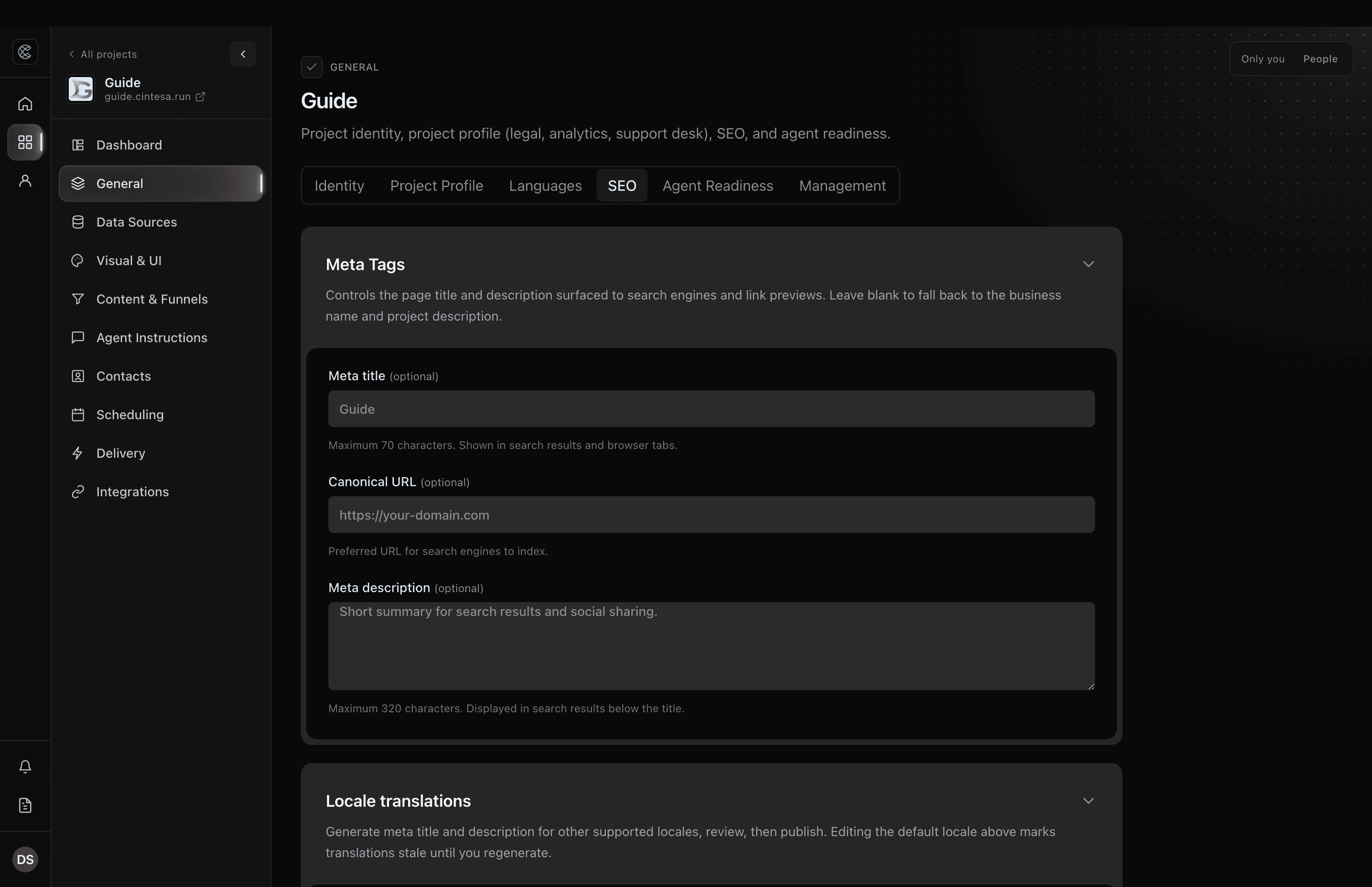
- Open General → SEO.
- Edit the meta title, description, and canonical URL. The canonical URL starts from the project domain. Another language adds that language’s path, such as
/ru. Save general stores them for the default language. - When the project has another language, Meta Tags shows a tab for each language. Select a language, then Generate translations. A language you just added starts on Generate translations. Review the fields, then Save general. The live page uses that language’s meta tags after the save.
- After a translation exists, the button is Regenerate translations. It replaces only the selected language. If that language is already on the live page, the replacement is saved immediately. Edit any language’s fields, then Save general. A confirmation appears when the save succeeds, and an error notice appears when it does not.
Changing the default language’s title or description marks the other languages out of date until you regenerate them.
Plan-related feature. Generate translations and Regenerate translations on this page and on Agent Instructions → Messages, Generate localizations on Scheduling → Services, and Refresh UI translations are available on Pro or higher (AI content generation). You can still edit SEO fields, message text, and service text by hand on every plan. See Plans.
Visitor UI strings (header CTA, composer placeholder, footer, and contact address) translate automatically on save when that feature is on. Refresh UI translations regenerates those live overlays and leaves message text as it is. Message text — fallback, handoff, the input disclaimer, and the returning-visitor message — is edited per language under Agent Instructions → Messages. Select a language, then Generate translations, and Save messages to use it on the live page. After a translation exists, Regenerate translations replaces only that language. If it is already on the live page, the replacement is saved immediately.
A traffic rule with a landing path can provide campaign-specific title, description, share image, and index control. Those values apply to the campaign path; project and locale SEO remain the defaults everywhere else.
sitemap.xml lists the default language and each extra language as its own URL. A landing path that is its own page is listed the same way, once per language that page uses.
Social profiles
Add official social profile URLs under General → Project Profile. They appear in supported footers, the Social links block, and search metadata.
© 2026 Cintesa. Guide text and screenshots are Cintesa product materials for personal and operator use. Do not scrape or republish them commercially without permission. Terms of Service · Privacy Policy.