

Traffic rules
Prefer a Cintesa Funnel or sections when a campaign, landing path, or returning visitor matches.
Last updated on
Open Content & Funnels → Traffic rules. A rule is the campaign control point for a matched landing path, query, referrer, or returning visitor. It can select a Funnel, choose landing sections, and override campaign-specific landing controls.
Plan-related feature. Available on Starter or higher (Funnels & traffic rules). On Basic the dashboard shows an upgrade notice and create/save stay off. See Plans.
Create a rule
- Open Traffic rules.
- Create a rule: name it, set priority, and leave Enabled on when you want it live.
- When the project has more than one language, set Language: All languages, or one language. Attached content sections already belong to one language. Language is AND’d with the matchers — a Hebrew campaign does not fire on the English URL.
- Add Matchers — one per line:
- Campaign query:
utm_source=linkedin - Landing path:
/pricing
- Campaign query:
- Open Additional matchers (directly under Matchers) when you need:
- Landing path prefixes (
/ru,/products/name) - Referrer domains
- An IP allowlist
- Returning visitor — Any / Returning only / New visitors only
- Landing path prefixes (
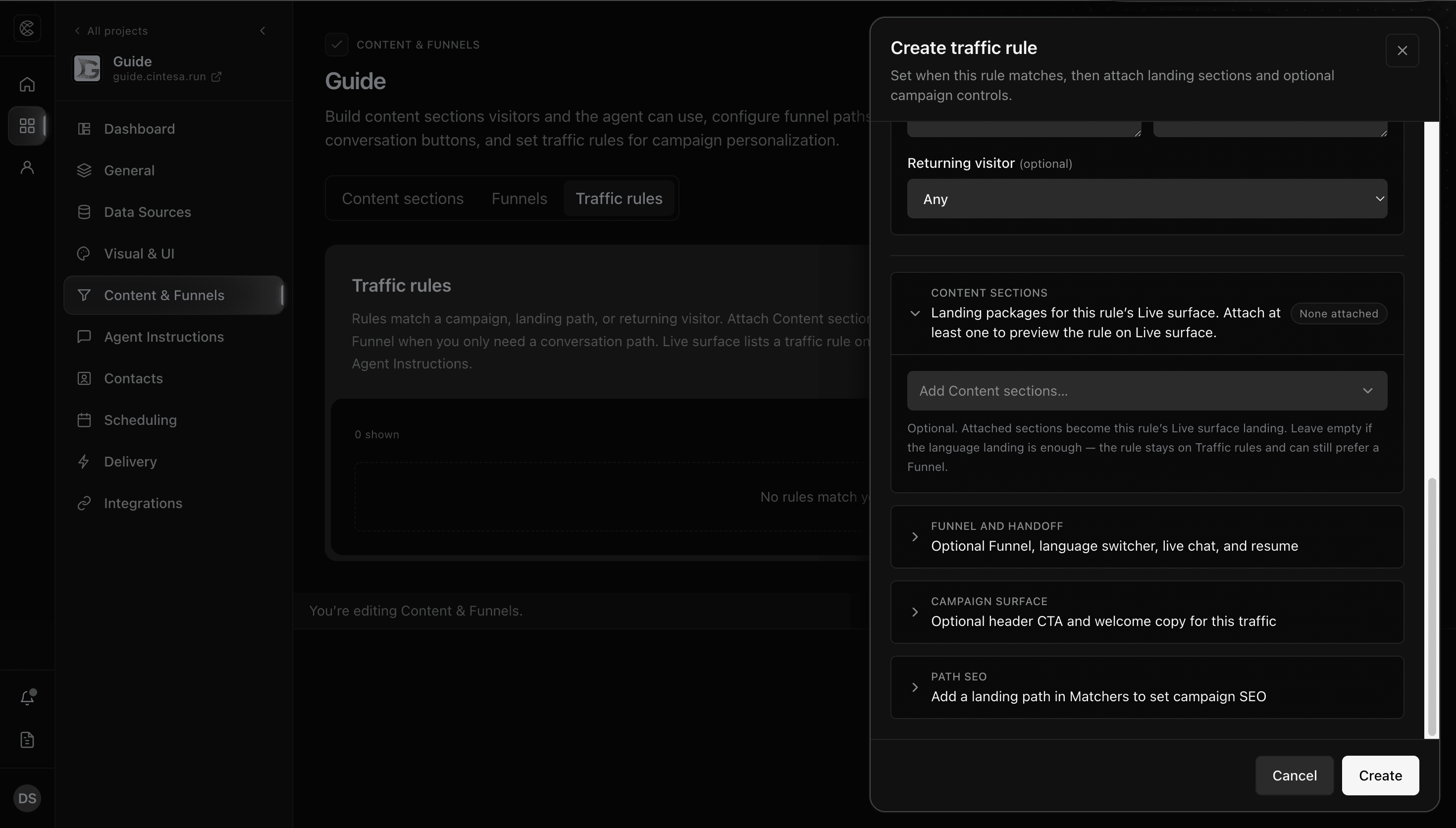
- Open the campaign settings accordion. Content sections is first — attach sections that should appear on this rule’s Live surface landing. In the popup, filter available sections by language, review the selection, then Apply sections. When the rule has one Language, the list prefers sections for that language.
- Open Funnel and handoff to pick the single Funnel this campaign should prefer, plus language-switcher visibility, a named Slack live-chat destination, and returning-resume behavior. The Funnel still starts only when the visitor clicks its button or a header CTA configured to open it.
- Open Campaign surface for a header CTA (agent intent, the selected Funnel, or an HTTPS URL) and optional welcome / returning welcome copy.
- Open Path SEO when the rule has a landing path — title, description, share image, and whether search engines may index the path.
- Save.
The table lists Language (on multilingual projects) and attached content sections as badges.
Funnel and section attachments
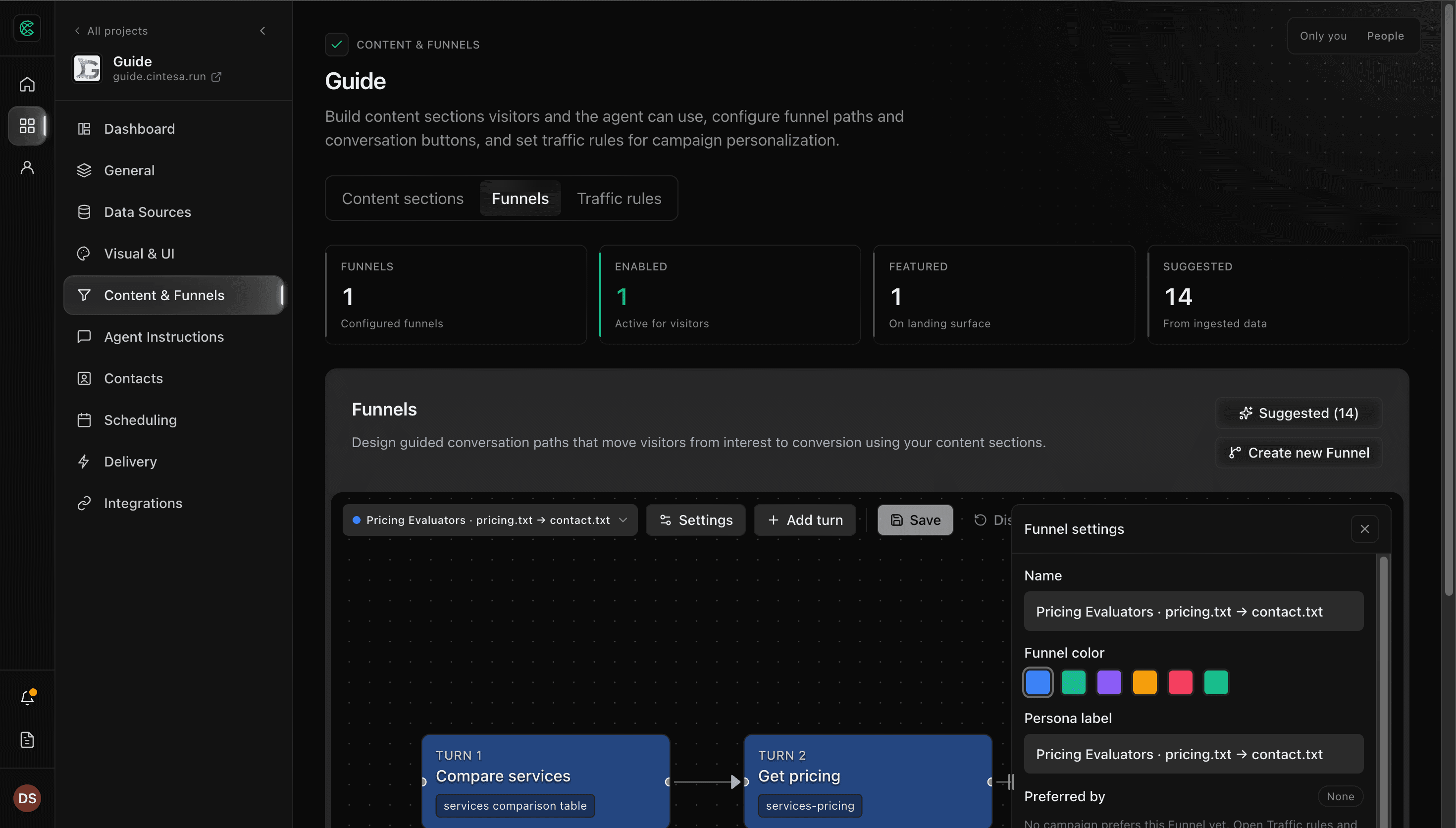
- Pick a Funnel on the traffic rule. Funnel settings show a read-only Preferred by list — change the attachment on the rule.
- Attach content sections to a rule when those sections should show on that traffic-rule landing (leave this empty if the language landing is enough). You can attach from either side: on the rule, or on All sections from a section row’s menu (⋮ → Landing visibility), which lists this rule as a checkbox. On a multilingual project the row menu offers a rule only when the rule and the section share a language. Attaching sections is what makes the rule appear as a Live surface composition.
- Use Live surface on Sections to preview a language URL or a traffic rule before you share the site. Composition lists a traffic rule only when Content sections are attached. That preview is only those attached sections and that landing’s hero (or no hero if none is attached). The language landing hero does not appear on this composition. A Funnel-only rule stays valid here; it just does not appear as a Live surface composition. Leftover language-path rules stay on Language options. A disabled rule with attached sections can still be previewed. A rule limited to one language previews that language URL.
Chat reply language still comes from Agent Instructions, not from the traffic rule.
Campaign path SEO
Path SEO appears when the rule has a landing path such as /partners. The highest-priority enabled rule for that path and language supplies stable metadata to visitors and crawlers. Turning Allow search indexing off adds noindex and removes that path from sitemap.xml.
A path is listed when the site serves it as its own page and search indexing is allowed. Each enabled language gets its own URL for that page. Query-only, referrer-only, IP, and returning rules do not create sitemap URLs. A language prefix such as /ru is the language homepage already listed for that language, not a second page. Campaign metadata does not change based on those request details.
Contact campaign attribution
When an identified visitor submits a lead form or books, Contacts → All contacts → Campaign records the latest qualified campaign:
- A matched traffic rule wins. Campaign is the rule name. Contacts also keep the rule id.
- If no rule matches, a valid
utm_campaignquery still creates Campaign from that sanitized value. No traffic-rule id is stored. - If there is no rule and no valid
utm_campaign, Cintesa does not create or replace Campaign. An existing value stays.
A later identified submission through another traffic rule or utm_campaign updates Campaign to that latest touch.
Cintesa keeps only the standard UTM fields: utm_source, utm_medium, utm_campaign, utm_term, and utm_content. Arbitrary query parameters, click IDs, tokens, and other secrets are discarded. The full landing URL is not stored — only the landing path, and the referrer domain when it is reliable.
Language-homepage rules and admin previews are not recorded as campaigns.
Locale path-prefix rules
After you add locales under Languages, use Sync locale traffic rules on General → Languages. That creates path-prefix rules for non-default languages only and sets Language to that locale. It does not replace campaign or returning-visitor rules you already wrote.
When a rule does nothing
The Funnel and traffic rule must be saved, and the visitor URL or campaign must actually match. Priority decides which enabled campaign owns CTA, welcome, SEO-independent surface controls, live-chat routing, resume, and contact attribution when more than one matches.
© 2026 Cintesa. Guide text and screenshots are Cintesa product materials for personal and operator use. Do not scrape or republish them commercially without permission. Terms of Service · Privacy Policy.