

Go live
Put a Cintesa project live or under construction, then attach a custom domain when you are ready.
Last updated on
When the five-step workflow is complete, visitors can see the project on its Cintesa URL. You still control whether the public site is open on General → Management.
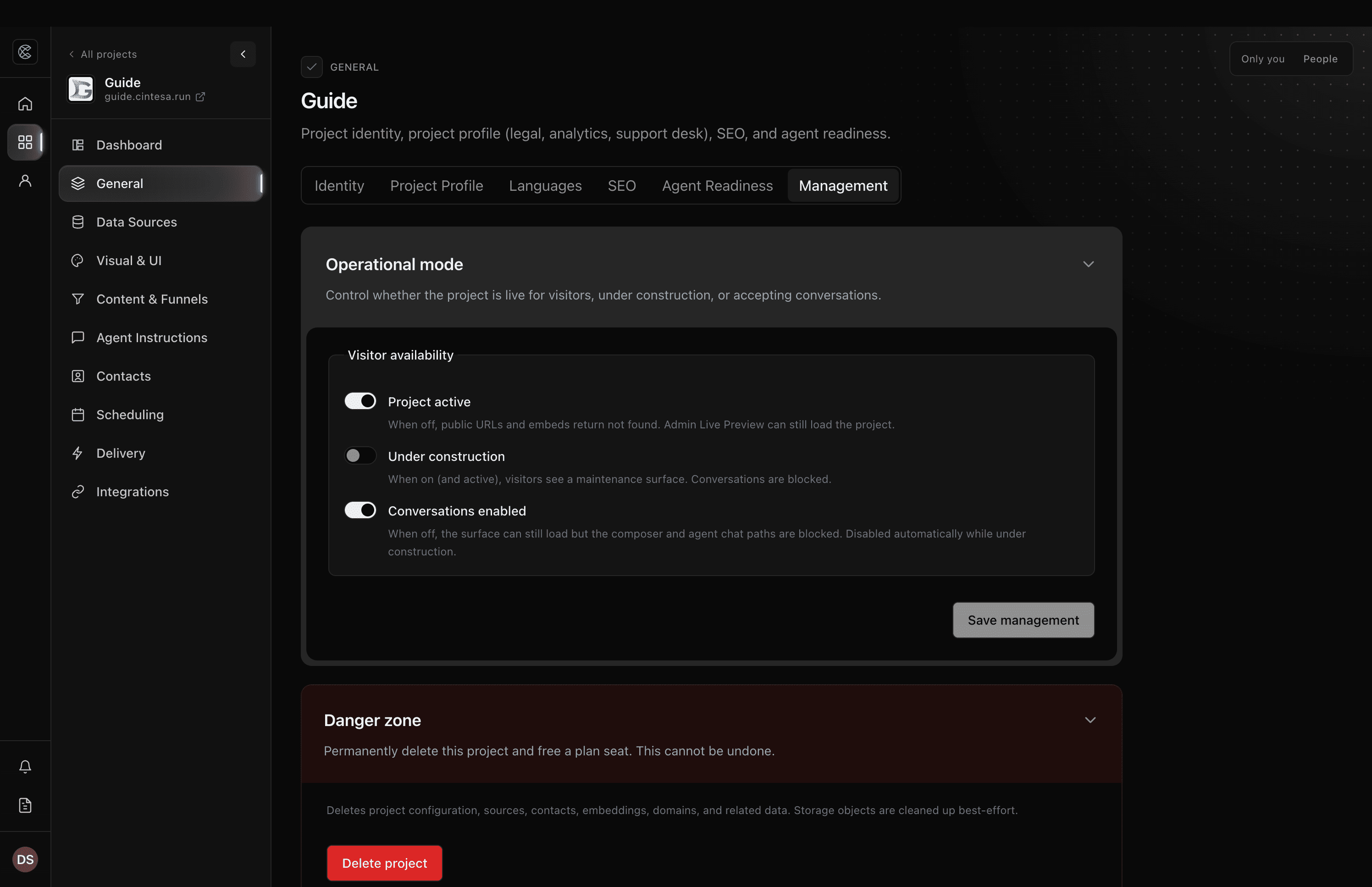
Open the project for visitors
- Open General → Management.
- Leave Project active on.
- Turn Under construction off when you want the full site, not a maintenance page.
- Leave Conversations enabled on if visitors should talk to the agent.
- Click Save management.
Under construction (while active) shows visitors a maintenance surface and blocks conversations. Turning Project active off hides public URLs and embeds (not found). Dashboard Live Preview can still load the project.
The full toggle list, who can change it, and Delete project are on Project management.
Custom domain
A custom domain is optional for first launch. When you are ready, follow Domains.
After you go live
Keep Agent Instructions published when you change how the agent should answer. Update Sources when the website changes. Freshness of this guide follows shipped product — if a control moves, the matching page here should move with it.
© 2026 Cintesa. Guide text and screenshots are Cintesa product materials for personal and operator use. Do not scrape or republish them commercially without permission. Terms of Service · Privacy Policy.